
»ID Cards (Credentials), Encoders, and Door Readers
Welcome to our comprehensive guide on ID Cards, Encoders, and Door Readers at Chapman University!
Whether you’re a student, staff member, or visitor, understanding how our access control systems work is essential for smooth and secure movement across campus. This page will walk you through the different types of ID Cards, Encoders, and Door Readers, how to use them, and the variety of door readers you’ll encounter in campus buildings.
Please click on the dropdowns below to learn more:
Encoders
What is an ID Card Encoder?
How do I use an Encoder?
You insert the ID into the Front Slotof the Encoder with the ID Picture facing up, picture on the left,and forward. The Encoder will pull the ID into the unit, and once updated, it will be ejected outward. A successful encoding will take 10-15 seconds, depending on the updates requested.
An unsuccessful encode will eject immediately. If this happens, you should repeat the process until you hear 3 to 5 “clicks” from the Encoder. There are many reasons for an unsuccessful encoding: a dirty magstripe (wipe clean and try again), a worn-out magstripe, a cracked or damaged magstripe, or a dirty encoder.
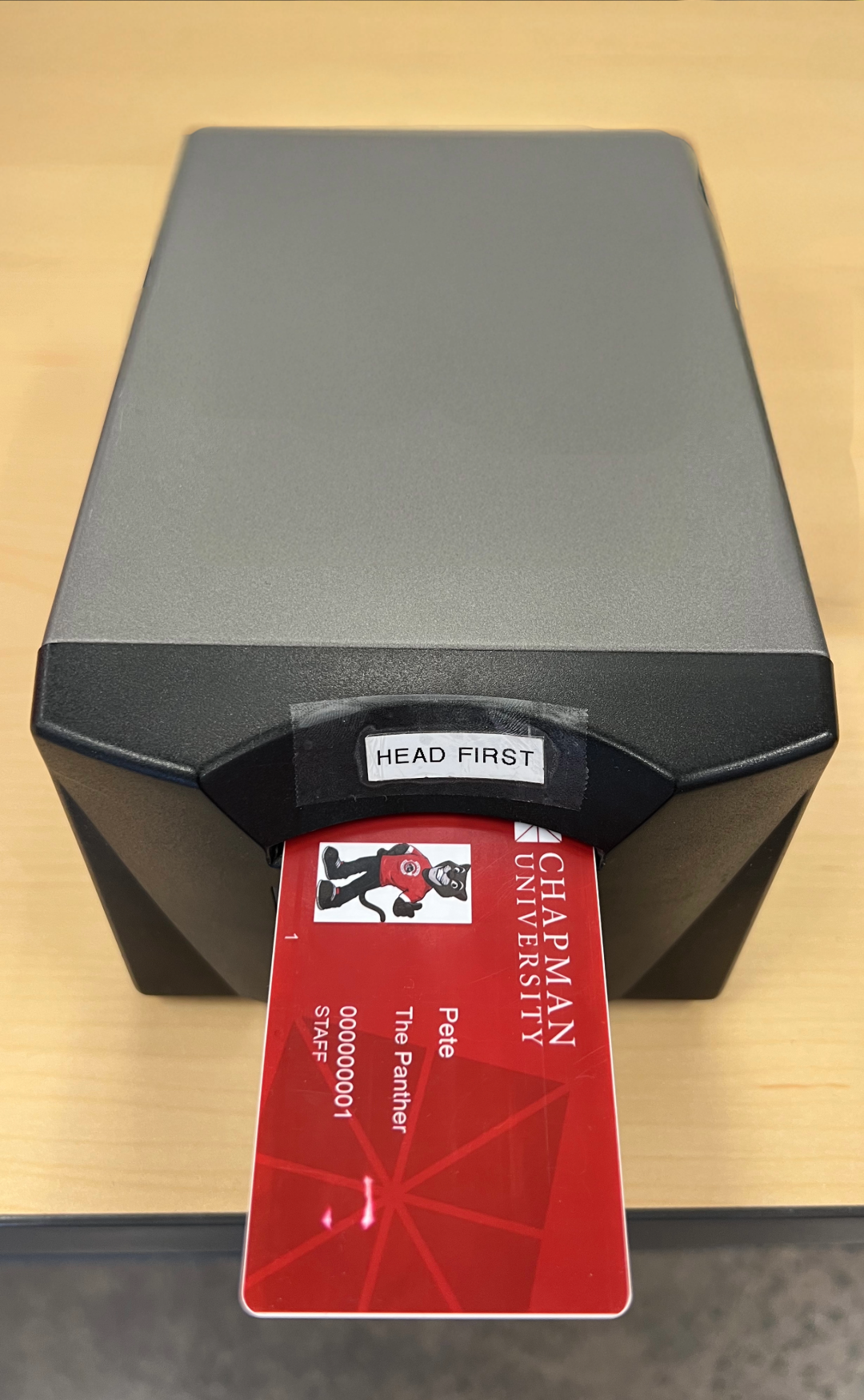
Are there different kinds of ID Card Encoders on campus that work differently, or are they all the same?
Where are the Encoders located on campus?
Please use the interactive campus map to find the spaces listed above. PDF maps are also available: Orange Campus PDF map, Rinker Campus PDF map.
Mobile Credentials Pilot (Harris Residence)
Mobile credentials activation and setup
The Pilot Program for mobile credentials is currently being piloted exclusively for
students living in the Harris Residence. During the pilot, eligible residents can use mobile credentials to access their Harris
apartment and designated Harris facilities. Mobile credentials may not work at other
locations on campus.
Mobile credentials are not intended to replace your Chapman ID card or provide mobile
access throughout campus. You must carry your Chapman ID card with you at all times.
Before You Begin
To participate, you will need:
- A compatible iPhone (iOS 12 or later) or Android (Android 12 or later) smartphone
- An active internet connection
- Bluetooth enabled on your phone
- The HID Mobile Access app
- The invitation code emailed to you
Your invitation code expires seven days after being issued, so please complete the activation process before it becomes invalid.
Set Up Mobile Access
- Download the HID Mobile Access App
- Activate Your Mobile Credential (See the activation visuals below for reference)
- Open the HID Mobile Access app.
- Enter the invitation code provided to you.
- DO NOT SELECT SIGN IN WITH SSO.
- Follow the on-screen instructions to complete the setup.
- Wait for Your Credential to Appear
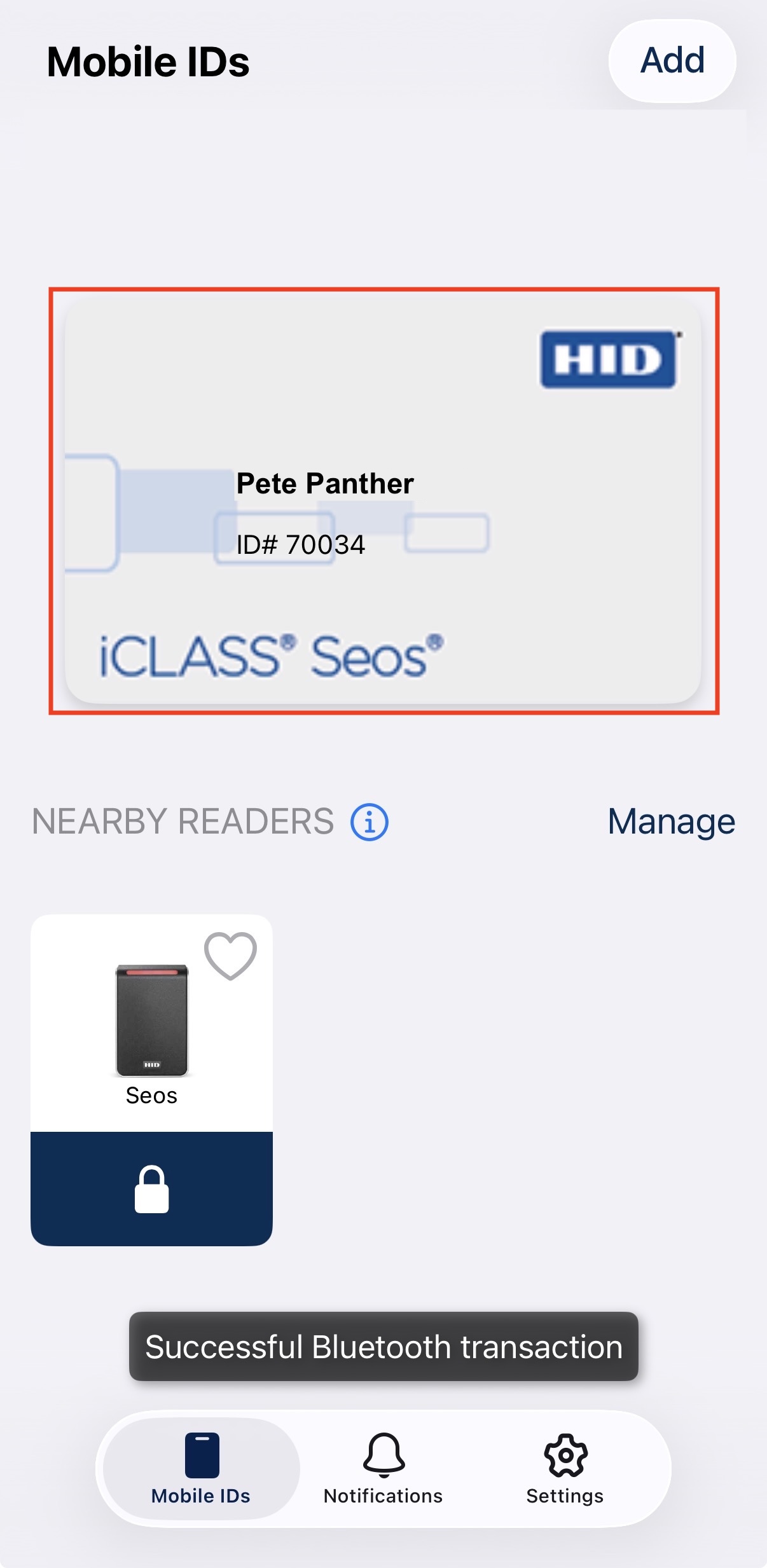
- After activation is complete, your mobile credential will appear in the HID Mobile Access app.
- Use Your Phone at Your Harris Apartment
- Once your credential has been activated:
- Unlock your phone.
- Open the HID app or make sure it is running in the background.
- Hold it close to the approved reader near the door.
- Wait for the reader to display a green light and play a beep.
- Enter your PIN to unlock the door.
- Once your credential has been activated:
Activation screenshots
- Launch the HID mobile access app.
- Enter the invitation code provided to you and select Get Started
- DO NOT SELECT SIGN IN WITH SSO.
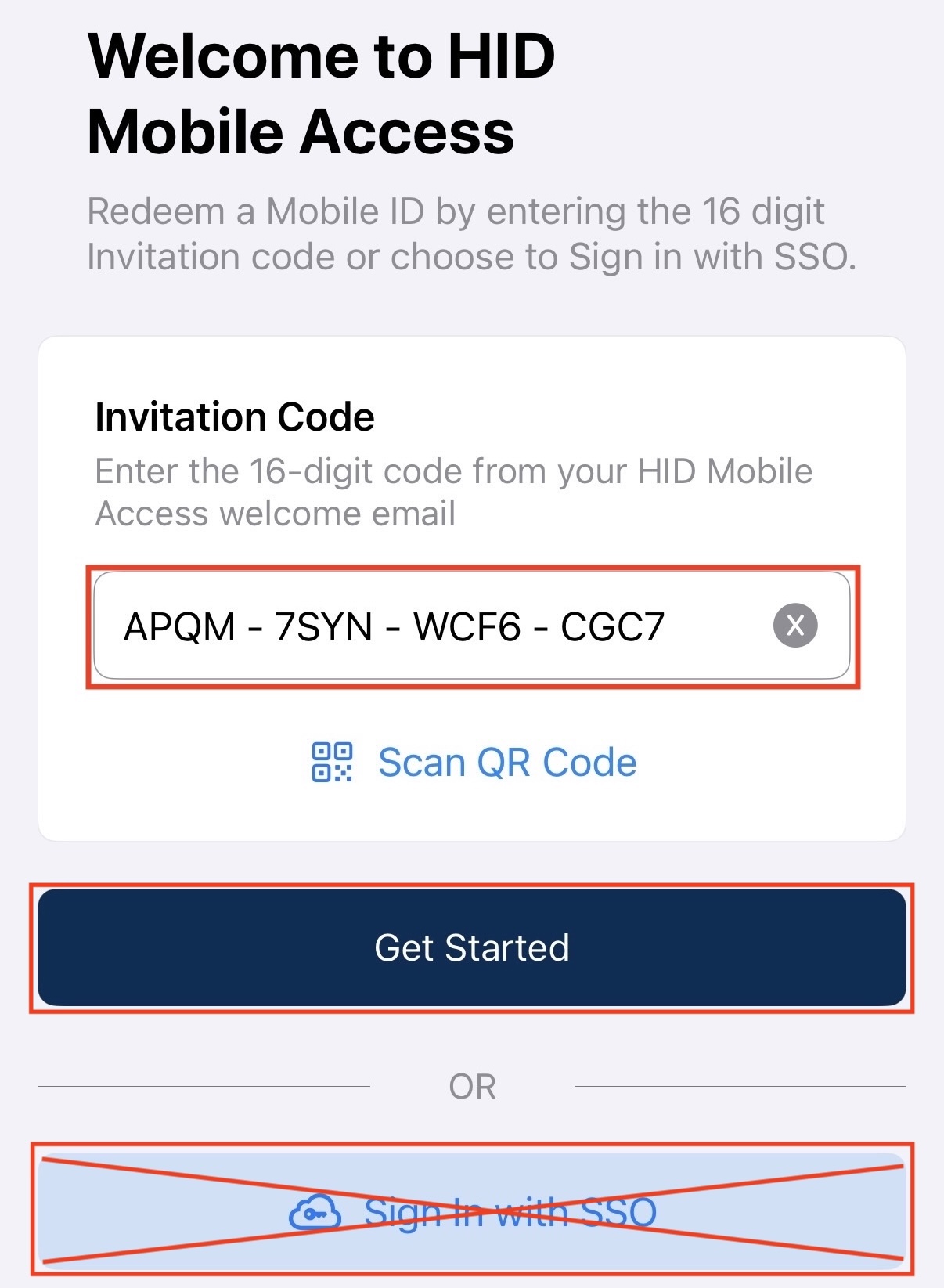
- DO NOT SELECT SIGN IN WITH SSO.
- Follow the on-screen instructions to complete the setup.
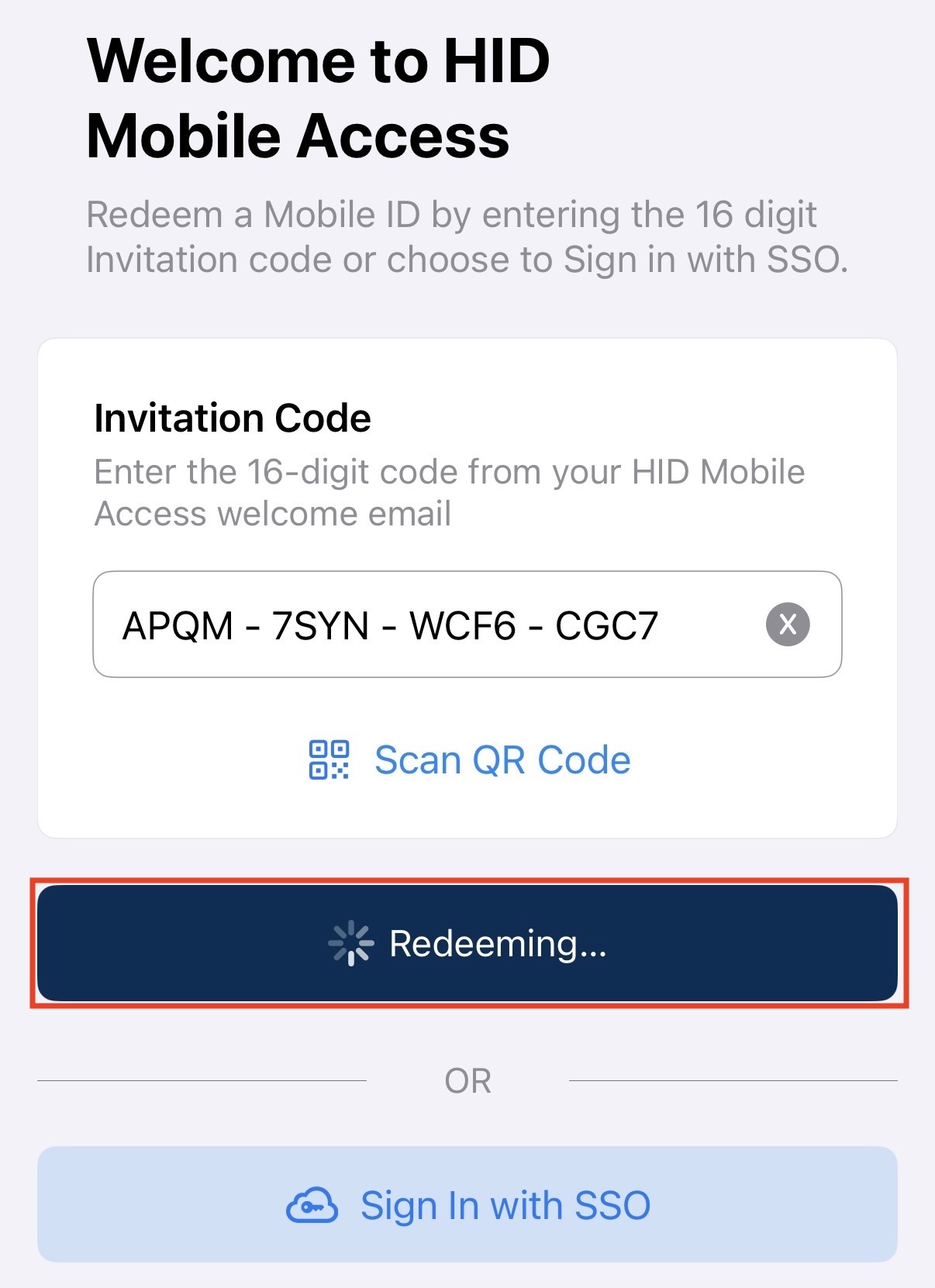
- After the setup is complete, the app will display a new digital activation card featuring
your name and digital ID number.
Frequently Asked Mobile Credentials Questions
Who can participate in the pilot?
The pilot is exclusively for eligible students living in Harris Residence. Mobile
credentials are supported only on Harris apartment door locks during the pilot.
Can I use my mobile credential elsewhere on campus?
Mobile access is currently specific to Harris apartments and may not work at other
campus locations during the pilot. Continue carrying your physical Chapman ID card
for access outside the Harris Residence.
Do I need to keep the HID Mobile Access app open?
After the initial setup, the app can run in the background. If you experience a problem,
open the app and try again. If the app is running in the background, iOS users will find that Apple Wallet launches
first when using mobile credentials to unlock the door.
What versions of iOS and Android are supported?
iOS 15 or later and Android 12 or later.
Should I continue carrying my Chapman ID card?
Yes. We recommend carrying your physical Chapman ID card as a backup. Your physical
card will continue to work for entering your Harris apartment.
What should I do if my credentials do not appear in the app?
Credential activation may take some time. If your credential does not appear after
you enter your invitation code, contact the IS&T Service Desk at servicedesk@chapman.edu for assistance.
What should I do if my phone does not unlock the door?
Try the following:
- Confirm that Bluetooth is enabled.
- Unlock your phone before holding it near the reader.
- Open the HID Mobile Access app if you have not used it recently.
- Hold your phone directly next to the reader for 3 seconds.
What should I do if my phone is lost or stolen?
Immediately contact the IS&T Service Desk or Housing and Residence Life. Your mobile credential can be deactivated, and a new one will be assigned to you
to help protect access to your residence. Report the issue immediately to servicedesk@chapman.edu.
What happens if my phone battery dies?
Use your physical Chapman ID card. You should carry your ID card with you at all times.
Need Help?
For help installing the app, activating your credential, or troubleshooting mobile
access, contact the Chapman University IS&T Service Desk at servicedesk@chapman.edu.
What should I do in case of an emergency or if I’m locked out of my room?
In case of an emergency, contact Public Safety at 714-997-6763. If you are locked
out of your room, contact your RD / RA.
Why is Chapman piloting mobile credentials in the Harris Residence?
Chapman University is testing mobile credentials at Harris Residence to evaluate the
student experience, convenience, and reliability of smartphone-based apartment access.
Additional Considerations
Requesting Keycard Access help.
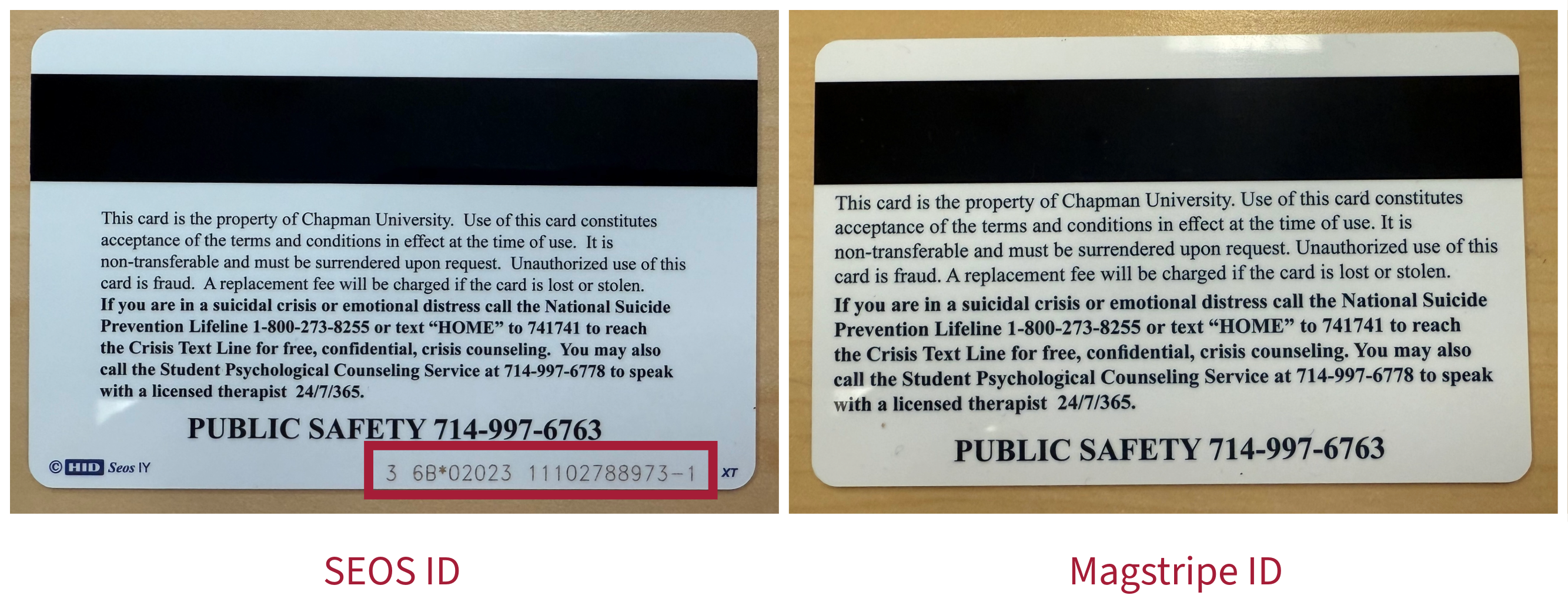
- When requesting access or changes, please use the Service Desk Keycard Access Request Form, and include the following information: Full name of the user needing access, Chapman
ID number, the SEOS number for Wi-Fi lock - five-digit code on the back of the ID
card after the 6A* or 6B* - if applicable (a picture is preferred), and the building
(interior/exterior), room/office number of the door, or the lab/classroom/conference
room space.
- Wi-Fi readers update at intervals. Depending on the reader or location, it can take between 10 minutes and 2 hours for the reader to receive the new access changes.
- A campus-wide initiative is underway to replace all interior and exterior readers with Wi-Fi readers that update within seconds.