
- Campus Services
- Budget Office
- Campus Controller
- Campus Planning and Design
- Career and Professional Development
- Event Operations
- Facilities Management
- Fire & Life Safety
- Institutional Compliance and Internal Audit
- Institutional Research and Decision Support
- Legal Affairs
- Mail Services
- Marketing and Public Affairs
- Parking Services
- Public Safety
- Sustainability
- Copy Jobs
- Campus Resources
- Marketing and Public Affairs
- Security
- 2 Factor Authentication
- Activate Your Account
- Cybersecurity Awareness Month
- Data Risk Classification
- DMCA
- Email Security
- FAQ's
- Fischer ID Management
- Information Security Best Practices
- Password Management
- Phishing
- Projects and Services
- Social Media Password Reset
- Trending Emails Scams
- Zoom Bombing Prevention
»Cybersecurity Awareness Month
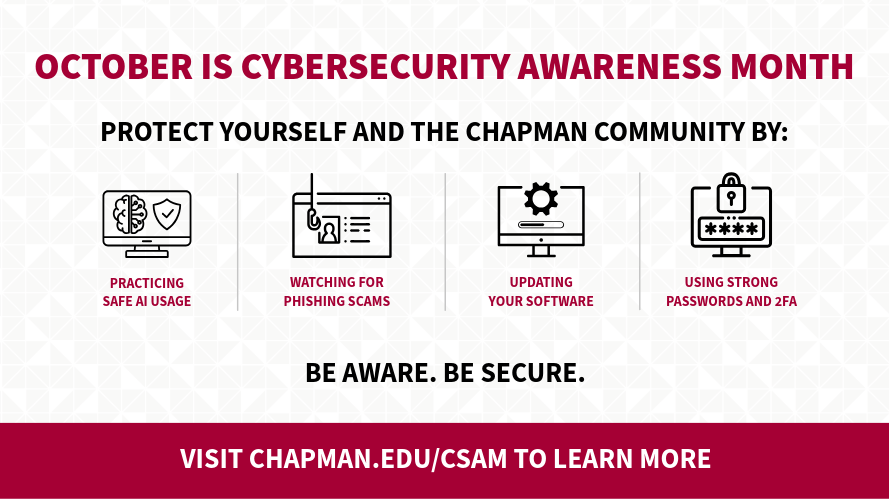
Cybersecurity Awareness Month, held every October, is an annual initiative dedicated to helping individuals and organizations stay safe in an increasingly connected world. Throughout October, the Chapman community is encouraged to strengthen its cybersecurity knowledge and adopt simple but effective security practices.
Build Your Cybersecurity Skills
Want to strengthen your cybersecurity knowledge? Enroll in Chapman University's Information Security Awareness course to learn practical skills for identifying phishing scams, protecting sensitive information,
using AI responsibly, creating strong passwords, and staying safe online.
2026 Cybersecurity Awareness Month Campaign
Explore the tabs below for tips, resources, and practical guidance from Chapman University's 2026 Cybersecurity Awareness Campaign. Small actions today can make a big difference in protecting yourself and our campus community.
Stay Safe in the Age of AI
Artificial Intelligence is transforming how we work, learn, and communicate. While AI can improve productivity and efficiency, it also provides cybercriminals with new ways to craft convincing scams and deceive people into sharing sensitive information. Staying informed and cautious is essential to protecting yourself and the Chapman community.
AI Creates New Security Challenges
Today's AI tools can generate realistic emails, voice messages, videos, and websites that are difficult to distinguish from legitimate communications. Attackers use these capabilities to build trust, create urgency, and encourage people to act before they think.
At the same time, users may unintentionally expose sensitive information by entering confidential data into AI tools without considering how that information is stored or used.
Common AI-Related Risks
AI-Powered Scams
Be aware of scams that use AI to:
- Create convincing phishing emails.
- Impersonate trusted individuals through voice cloning.
- Generate realistic fake videos and images.
- Build professional-looking fake websites.
- Create believable online identities for fraud and social engineering.
Unsafe AI Usage
Security risks can also occur when people:
- Upload sensitive or confidential information into AI tools.
- Use unapproved AI applications or browser extensions.
- Share passwords, financial information, or internal documents in prompts.
- Grant excessive permissions to AI tools.
- Use free AI services without understanding how data is stored or shared.
Five Ways to Stay Safe
- Pause: If a request feels urgent, stop and think before responding, clicking a link, or sharing information.
- Verify: Confirm requests through a trusted method, especially those involving money, passwords, access, or sensitive data.
- Use Approved Tools: Only use university-approved AI tools.
- Protect Sensitive Information: Never share confidential, personal, financial, or institutional data unless it is specifically approved for use within the tool.
- Report Suspicious Activity: If something seems unusual or suspicious, report it promptly. Early reporting can prevent larger incidents.
Quick Self-Check
Before you click, share, or paste information into an AI tool, ask yourself:
- Do I know and trust the source?
- Have I verified the request independently?
- Is this an approved AI tool?
- Does this contain sensitive information?
- Would I be comfortable if this information became public?
Stay Vigilant
AI is a powerful technology, but cybersecurity still depends on thoughtful human decisions. By staying alert to AI-enabled scams, protecting sensitive information, and using AI responsibly, every member of the Chapman community can help create a safer digital environment.
Watch for Phishing Scams
What is Phishing?
Phishing is a cyberattack in which a scammer impersonates a trusted organization, colleague, supervisor, vendor, or service provider to convince someone to take an action. That action might include:
- Entering a password on a fake website.
- Opening a malicious attachment.
- Approving a fraudulent payment request.
- Sharing confidential information.
- Installing malware on a device.
Common Red Flags
Attackers are becoming increasingly sophisticated, but many phishing messages still
share warning signs. Be cautious when you notice:
- Generic greetings such as "Dear User" or "Dear Student".
- Requests for passwords or sensitive information.
- Urgent deadlines or threats requiring immediate action.
- Unexpected attachments or links.
- Slightly misspelled email addresses or website URLs.
- Messages that seem unusual, even if they appear to come from someone you know.
Chapman Information Security team recommends verifying the sender, avoiding suspicious links and attachments,
and independently confirming requests through a trusted channel.
What To Do If You Receive a Suspicious Message
If you receive an email, text, or message that seems suspicious:
- Do not click links or open attachments.
- Do not provide usernames, passwords, financial data, or personal information.
- Verify the request through another channel, such as a phone call or separate email conversation.
- Report the message immediately.
- Delete the message after reporting it.
Chapman's Information Security team recommends forwarding suspicious emails to abuse@chapman.edu for investigation. The university also encourages community members to report anything suspicious, even when they are unsure. Early reporting helps identify new attacks and protect others across campus.
Use Strong Passwords and Two-Factor Authentication
Strong passwords and Two-Factor Authentication (2FA) are two of the most effective ways to protect your Chapman University account. Together, they help safeguard your email, Microsoft 365 account, and other university resources from unauthorized access.
Create a Strong Password
Follow these best practices:
- Make it at least 12 characters long.
- Include uppercase and lowercase letters and numbers.
- Incorporate special characters (e.g., ~! @#$%^&()-_+=), including spaces.
- Consider using a passphrase, a series of words combined into a phrase. This is an example of a passphrase: "Ch0c0l@teCakeIsMyFav0ritedess3rt."
- Password cannot contain the user's first, last, or account (username) name.
- Passwords that have been used previously cannot be reused.
Why 2FA Matters
Two-factor Authentication (2FA) adds a second layer of protection by requiring an additional verification step, such as the Microsoft Authenticator app, before access is granted. Even if your password is compromised, 2FA can help prevent unauthorized access to your account.
2FA Best Practices
- Only approve sign-in requests you initiated.
- Never approve unexpected authentication prompts.
- Keep your mobile device and authenticator app up to date.
- Continue using strong, unique passwords along with 2FA.
Protecting your account doesn't have to be complicated. By using strong passwords and enabling 2FA, you can significantly reduce your risk and help keep the entire Chapman community secure. If you suspect your account has been compromised, contact infosec@chapman.edu for assistance.
Update Your Software
Keeping your software up to date is one of the easiest and most effective ways to
protect your devices and Chapman University accounts from cyber threats. Software
updates often include important security patches that fix vulnerabilities cybercriminals
actively exploit. Delaying updates can leave your computer, smartphone, or tablet
exposed to malware, ransomware, and other attacks.
Why Software Updates Matter
Software vendors regularly release updates to improve security, fix bugs, and enhance
performance. Installing updates helps protect your device and university data from
known vulnerabilities.
- Fix security vulnerabilities before they can be exploited.
- Protect against malware, ransomware, and other cyber threats.
- Improve system stability and performance.
- Ensure compatibility with university applications and services.
- Help keep sensitive Chapman data secure.
Common Update Mistakes
Many security incidents occur because updates are postponed or ignored. Avoid:
- Delaying updates for weeks or months.
- Ignoring security update notifications.
- Using unsupported or outdated software.
- Turning off automatic updates when they are available.
- Downloading software updates from unofficial sources.
Best Practices for Keeping Software Updated
Follow these simple steps to stay protected:
- Enable automatic updates whenever possible.
- Install security updates as soon as they become available.
- Keep your operating system, web browsers, and applications up to date.
- Restart your device when prompted to complete updates.
- Use Chapman-managed devices whenever possible to ensure university security standards are maintained.
To update safely, use your system's built-in tools:
- Windows: go to Settings → Windows Update → Check for updates.
- MacOS: go to System Settings → General → Software Update.
- For other apps, only download updates from the official developer's website.
Chapman's Information Security team recommends keeping all devices and software up to date as part of a strong cybersecurity strategy. Combined with strong passwords, Multi-Factor Authentication (MFA), and phishing awareness, timely software updates help protect your accounts, university systems, and sensitive data. If you have questions about software updates or cybersecurity best practices, contact infosec@chapman.edu.
- Security
- 2 Factor Authentication
- Activate Your Account
- Cybersecurity Awareness Month
- Data Risk Classification
- DMCA
- Email Security
- FAQ's
- Fischer ID Management
- Information Security Best Practices
- Password Management
- Phishing
- Projects and Services
- Social Media Password Reset
- Trending Emails Scams
- Zoom Bombing Prevention