- Campus Services
- Budget Office
- Campus Controller
- Campus Planning and Design
- Career and Professional Development
- Event Operations
- Facilities Management
- Fire & Life Safety
- Institutional Compliance and Internal Audit
- Institutional Research and Decision Support
- Legal Affairs
- Mail Services
- Marketing and Public Affairs
- Parking Services
- Public Safety
- Sustainability
- Copy Jobs
- Campus Resources
- Marketing and Public Affairs
»Panther Guardian
Turn your phone into a personal safety device.
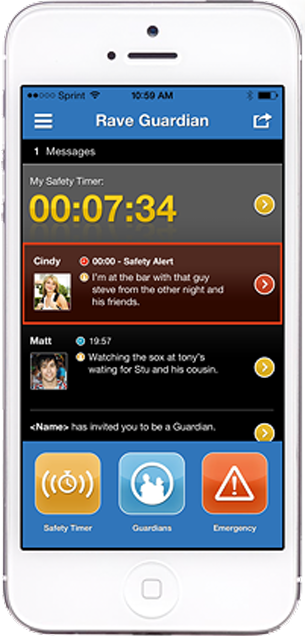
Download the FREE Rave Guardian (Panther Guardian) safety app to check in with family, friends, the Chapman University Department of Public Safety, or others you trust to help you stay safe both on and off campus. The Panther Guardian app is an effective way for students, staff, and faculty to communicate with Public Safety via a smart phone.
1. Sign up for Panther Guardian by downloading Rave Guardian for Free
Panther Guardian is one of the best ways to not only improve your personal safety but also your fellow guardians within your own private safety network. This application provides rapid and proactive communications with friends, family, co-workers, Public Safety, and even participating 9-1-1 call center in the event of an emergency.
2. Use Panther Guardian to Protect Yourself and Others
Set a Safety Timer – Notify people you trust to check in on you if you are alone or in an unfamiliar place.
Manage & Message Your Guardians – Invite family, friends, or others to be your Guardian, and communicate with them within the app as needed.
Easy Emergency Communication – Call Public Safety directly for help if you are in trouble and send text tips – including photos – if you see something suspicious.
Important Points to Remember
- In a campus emergency always dial 9-1-1 or (714) 997-6763. The Panther Guardian app should not replace the standard practice to report campus-based police, fire, suspicious circumstances, or medical emergencies to Public Safety.
- The Panther Guardian app should only be utilized in areas within the location of Chapman University.
- As with any cell phone usage, certain factors (such as signal strength, type and quality of your phone carrier, and dead spots) can affect the GPS locator accuracy.
- To maximize the full benefit of this app, update your profile with a current photo and accurate self-description, vehicle description, and medical conditions. The more information you provide in your profile, the easier it will be for Public Safety to locate you, if necessary. You can change your profile picture at any time.
- When using the escort timer tool, it is strongly recommended that you enter a status in text explaining to Public Safety about your current location, intended destination, intended course of travel, etc. This information will greatly facilitate any necessary response actions coordinated by Public Safety.
Frequently Asked Questions
Who is eligible to use the Panther Guardian?
Is my privacy protected?
Can Panther Guardian track me?
Does Panther Guardian work off-campus?
What information should I include in my account profile?
Are the tips sent through Panther Guardian anonymous?
What can I do if someone forces me to turn off Panther Guardian?

Download the Guardian app:
App Store (iOS)
Google Play (Android)